Transmission Module: Difference between revisions
Jump to navigation
Jump to search
No edit summary |
|||
| Line 21: | Line 21: | ||
<imagemap> | <imagemap> | ||
File:TransmissionModule_T.png|900px|alt=clickable image : form description| titre | File:TransmissionModule_T.png|900px|alt=clickable image : form description| titre | ||
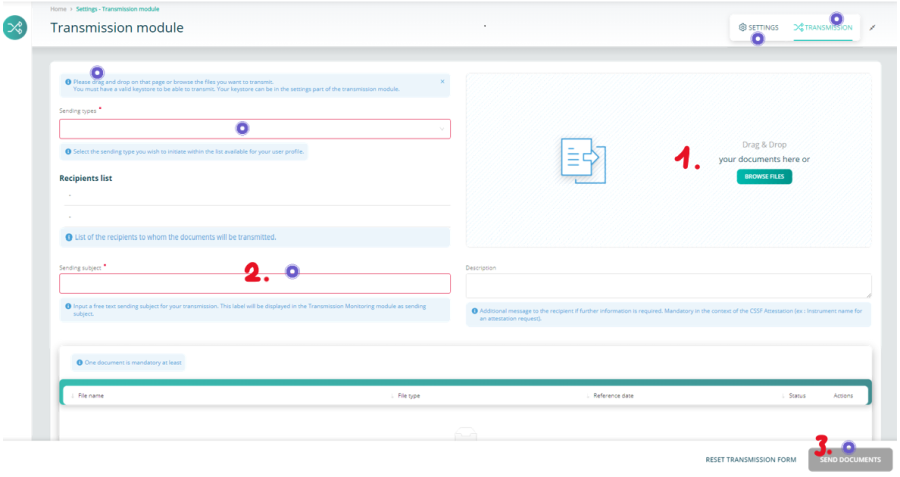
circle 128 97 | circle 128 97 30 [[#here| Each item is explained by a tooltip ]] | ||
circle 1105 27 | circle 1105 27 30 [[#here| You enter in the transmission part ]] | ||
circle 1000 51 | circle 1000 51 30 [[#Keystore Selection| This leads to the keystore's setting part ]] | ||
circle 386 359 | circle 386 359 30 [[#here| The red-framed fields must be filled ]] | ||
circle 1119 589 | circle 1119 589 30 [[#here| The send button will be available when all is right ]] | ||
desc none | desc none | ||
</imagemap> | </imagemap> | ||
Revision as of 09:56, 12 September 2024
Page's last update : 12/09/2024

- Add one or several documents
- Fill the red-framed fields
- Send
Keystore Selection
If you send reports through the e-file's historical channel (i.e. encrypted with keystore), your e-file local administrator should have provided you with the last activated keystore file.
- Click the settings button
- Click the Browse button and select your keystore
- Tick the 'Save keystore settings' to keep your change

It's done